STM32Cube フレームワークによる LED 点滅
STM32Cube フレームワークを使用して Blackpill STM32 ボード上の LED を点滅させてみましょう。
STM32Cube フレームワーク
STM32Cube フレームワークを使用すると、STM32 マイクロコントローラーの能力を最大限に活用できます。 STM32Cube フレームワークは、STM32 ハードウェアへの低レベルのアクセスを提供し、より効率的でパフォーマンスが最適化されたコードを作成できるようにします。
前提条件
このチュートリアルでは、次のハードウェアが使用されます。
Blackpill STM32 ボード
MCU:STM32F411CEU6 ボード: WeAct Black Pill V2.0 回路図
安価なクローン Blackpill STM32 ボードは 4 ドル以下で購入できます。他の STM32 ボードを使用することもできますが、platformio.ini ファイルと LED ピン番号を変更する必要があります。
ST-LINK V2 プログラマー
これはファームウェアをボードにアップロードするために必要です。安価なクローン ST-LINK V2 は 5 ドル以下で購入できます。
インストール
VScode と PlatformIO
PlatformIO は、VSCode 拡張機能マーケットプレイスからインストールできます。
STM32CubeProgrammer
これはファームウェアをボードにフラッシュするために必要です。
STM32CubeMX
このツールを使用すると、STM32 マイクロコントローラーを構成し、プロジェクトの初期化コードを生成できます。
クローンを作成 リポジトリ
git clone --branch blackpill-led-blink-stm32cube https://github.com/yuichiroaoki/stm32-tutorial.git
cd stm32-tutorial
クイックスタート
-
Blackpill STM32 ボードを ST-LINK V2 プログラマに接続します。
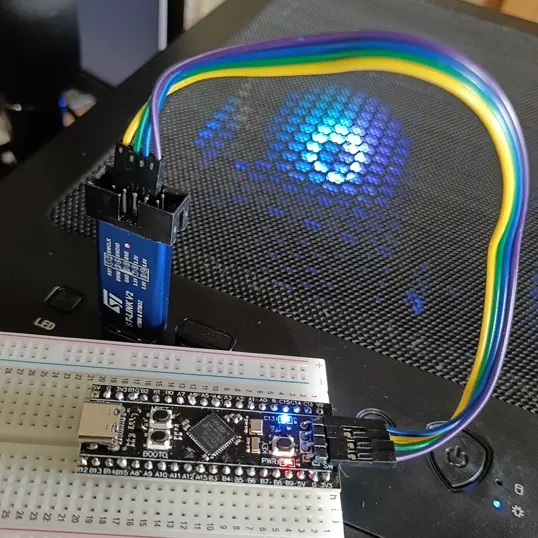
Connect the ST-LINK V2 programmer to the Blackpill STM32 board as shown in the image above. -
ST-LINK V2 プログラマをコンピュータに接続します。
-
VSCode でプロジェクト フォルダーを開きます。
-
左側のサイドバーの「PlatformIO」タブをクリックし、「
Upload」ボタンをクリックしてファームウェアをボードにアップロードします。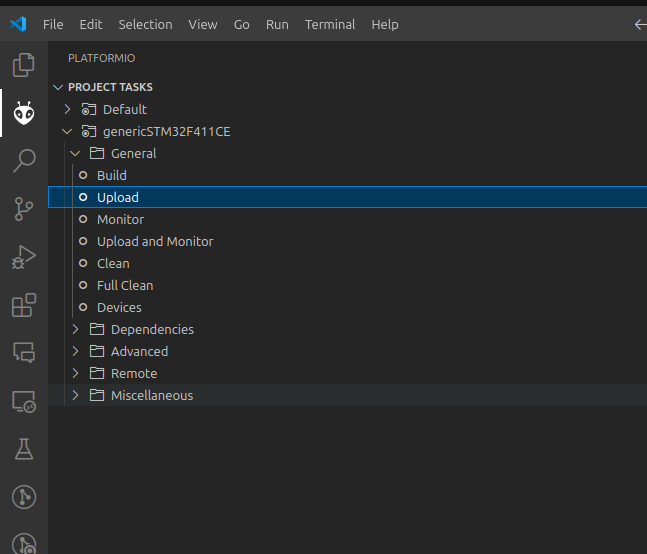
これで、Blackpill STM32 ボード上の LED が点滅しているのが確認できるはずです。
STM32CubeMX による初期コード生成
STM32CubeMX を使用すると、STM32 マイクロコントローラーを構成し、GPIO 構成やクロック構成などのプロジェクトの初期化コードを生成できます。
-
STM32CubeMX を開き、新しいプロジェクトを作成します。
-
STM32F411CE マイクロコントローラーを選択します。
-
サイドバーの
SYSをクリックし、[デバッグ] ドロップダウン メニューからSerial Wireを選択します。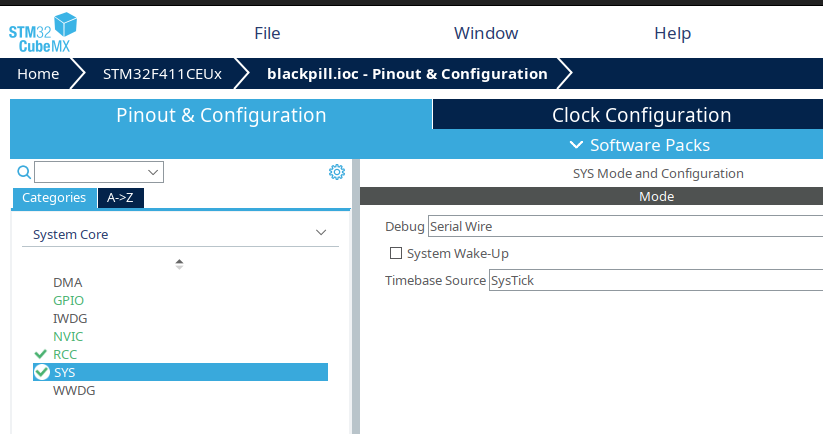 備考
備考This is important because without this setting, you won't be able to upload the firmware to the board.
-
[ピン配置と構成] タブで LED ピンをクリックし、[モード] ドロップダウン メニューで
GPIO_Outputを選択します。For the Blackpill STM32 board, the LED pin is
PC13. You should change the pin according to your board.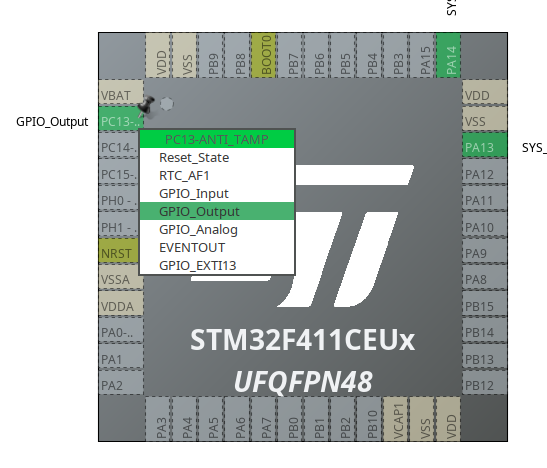
-
LED ピンを右クリックし、
Enter User Labelを選択し、ピンにLEDという名前を付けます。ヒントThis is useful because you can refer to the pin by name in your code.
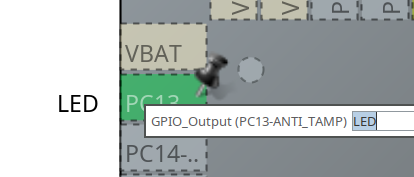
-
サイドバーの
RCCをクリックし、高速クロック (HSE) ドロップダウン メニューからCrystal/Ceramic Resonatorを選択します。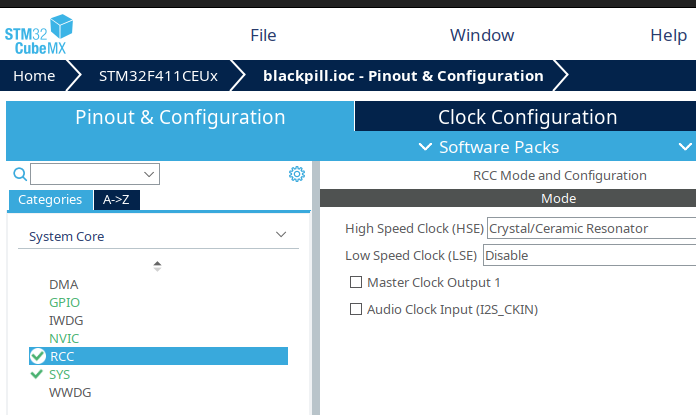
-
Clock Configurationタブをクリックし、次のようにクロック設定を構成します。- Input 25MHz in the HSE Value field
- Select
HSEinPLL Source MuxandPLLCLKinSystem Clock Mux - Input 100MHz in the
HCLKfield and pressEnterto calculate the values for the other fields.
注記The Blackpill STM32 board has a 25MHz crystal oscillator, so you should input 25MHz in the HSE Value field.
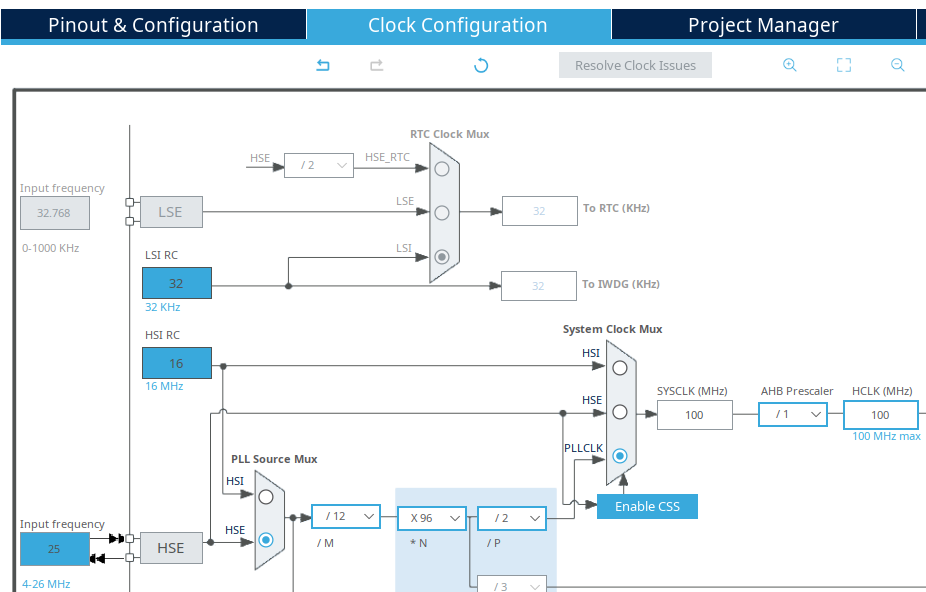
-
Project Managerタブをクリックし、Toolchain Folder Locationをプロジェクトの保存場所に設定し、コードを生成します。
これで、プロジェクトの初期化コードが完成しました。
PlatformIO で生成されたコードを使用する
-
生成されたコードを PlatformIO プロジェクト フォルダーの
srcフォルダーにコピーします。If you use Linux or macOS, you can use the following command to copy the code:
cp -r <STM32CubeMX project folder>/Core/**/* <PlatformIO project folder>/src/ -
main.cファイルのwhileループの最後に次の 2 行を追加して、LED を点滅させます。main.c/* USER CODE BEGIN 3 */HAL_GPIO_TogglePin(LED_GPIO_Port, LED_Pin);HAL_Delay(1000);注記If you named the LED pin
LEDin STM32CubeMX, theLED_GPIO_PortandLED_Pinwill be defined in thegpio.hfile, so you can use them in your code. -
STM32CubeMX によって生成された構成ヘッダー ファイルを使用するには、次の行を
platformio.iniファイルに追加します。platformio.iniboard_build.stm32cube.custom_config_header = yes -
左側のサイドバーの「PlatformIO」タブをクリックし、「
Upload」ボタンをクリックしてファームウェアをボードにアップロードします。
これで、Blackpill STM32 ボード上の LED が点滅しているのが確認できるはずです。