使用 PlatformIO 调试 STM32
让我们使用 PlatformIO 调试 LED 闪烁代码。
调试STM32
使用 PlatformIO 调试 STM32 非常简单。您可以使用 ST-LINK V2 编程器设置断点、监视变量并单步执行代码。
先决条件
在本教程中,使用以下硬件:
Blackpill STM32 板
单片机:STM32F411CEU6 主板:WeAct Black Pill V2.0 示意图
您可以以低于 4 美元的价格购买廉价的 Blackpill STM32 克隆板。您可以使用其他STM32板,但需要修改platformio.ini文件和LED引脚数。
ST-LINK V2编程器
您需要它来将固件上传到开发板并调试代码。 您可以以低于 5 美元的价格购买廉价的 ST-LINK V2 克隆版。
安装
VScode 与 PlatformIO
您可以从 VSCode 扩展市场安装 PlatformIO。
STM32CubeProgrammer
您需要它来将固件刷新到主板上。
克隆存储库
git clone --branch blackpill-led-blink-arduino https://github.com/yuichiroaoki/stm32-tutorial.git
cd stm32-tutorial
快速入门
-
将 Blackpill STM32 板连接到 ST-LINK V2 编程器。
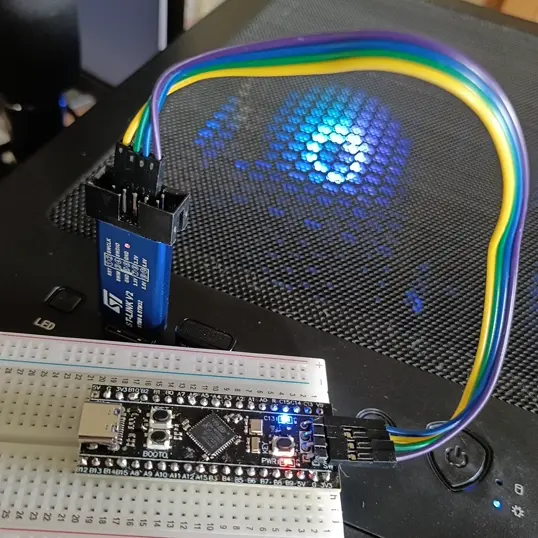
Connect the ST-LINK V2 programmer to the Blackpill STM32 board as shown in the image above. -
将 ST-LINK V2 编程器连接到计算机。
-
在 VSCode 中打开项目文件夹。
-
打开
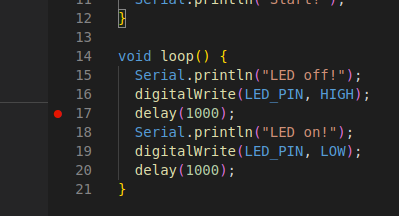
main.cpp并单击任意行号以设置断点。You can stop the program execution at the breakpoint and check the variable values.
-
单击左侧边栏上的
Run and Debug,然后单击Start Debugging按钮开始调试。The program execution will stop at the breakpoint, and you can check the variable values. For example,
SystemCoreClockis a variable that stores the system clock frequency. In the image below, the system clock frequency is 96 MHz.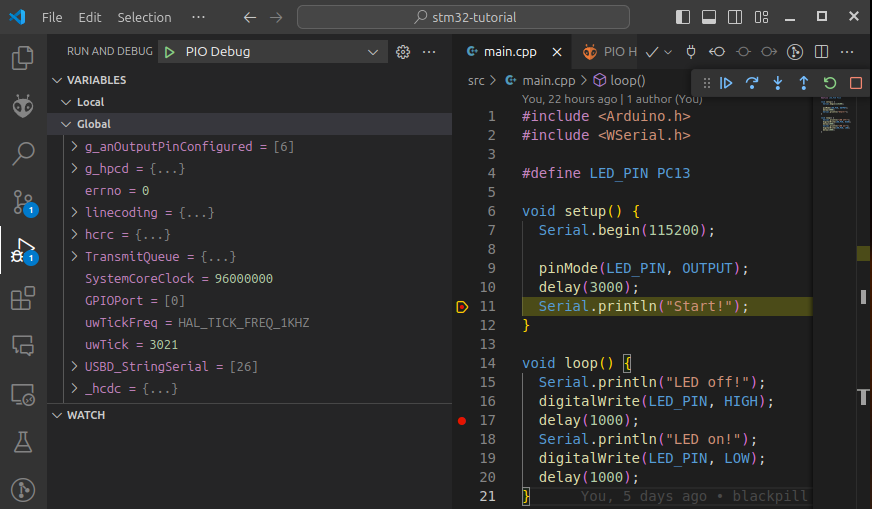
在本教程中,我们使用 Arduino 框架通过 PlatformIO 来调试 STM32 板。不过,您也可以使用 STM32Cube 进行调试。