Firmware
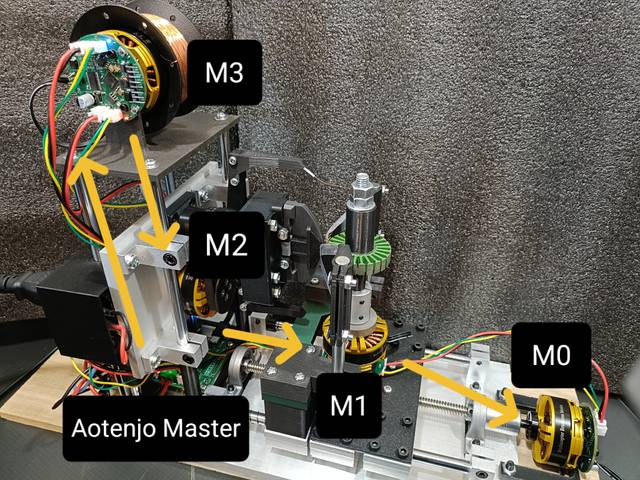
Winder uses four Aotenjo One motor controllers to control the four motors (M0, M1, M2, M3) and one Aotenjo Master as the CAN bus master to coordinate the motor controllers.
Installation
Install this repo
git clone https://github.com/aotenjo-xyz/one.git
Compatibility
The latest version is compatible with Aotenjo One v2.0 and later.
The latest version is not compatible with Aotenjo One v1.x.
If any board in the CAN network is an Aotenjo One v1.x or Aotenjo Master v1.x, all boards must run the v1.x firmware for compatibility.
In this case, even v2.x boards must be flashed with the v1.x firmware.
Upload Firmware
You need to upload the firmware to each motor controller (M0, M1, M2, M3). The firmware for M0, M1, and M2 is the same (closed-loop angle control), while M3 requires a different firmware (closed-loop torque control).
Below are the steps for each motor:
Upload to M0
Please upload the default firmware to the M0 controller. No changes are needed. If you don't know how to upload the firmware, please refer to the Aotenjo One documentation.
Upload to M1
-
Change line 1 in
src/CANProfile.hto set the motor ID to0x01for M1 as follows:#define MOTOR_ID 0x01 // M1 -
Upload the firmware to the M1 controller.
Upload to M2
-
Change the line1 in
src/CANProfile.hto set the motor ID to0x02for M2 like the following:#define MOTOR_ID 0x02 // M2 -
Upload the firmware to the M2 controller.
Upload to M3
-
Replace
src/main.cppandsrc/CANProfile.hwith the files fromexamples/M3/(Linux/macOS commands below)rm src/*cp examples/M3/main.cpp src/main.cppcp examples/M3/CANProfile.h src/CANProfile.h -
Upload the firmware to the M3 controller.